If you set hotel rates once and then react late, you leave money on the table. I’d handle seasonal pricing with a simple loop: map every date into a season, set a base rate with a floor and ceiling, watch pace and occupancy, check competitors, and review results after each season.
Here’s the short version:
- I sort future dates into low, mid, high, and peak seasons
- I tag holidays, events, and compression nights
- I build a rate ladder from a base rate, such as $159.00, with lower and upper limits
- I use OTB occupancy, booking pace, pickup, and lead time to decide when to move rates
- I review high-demand dates daily, shoulder dates monthly, and soft periods with strict floor control
- I track ADR, occupancy, and RevPAR so next season’s rules are better than this one’s
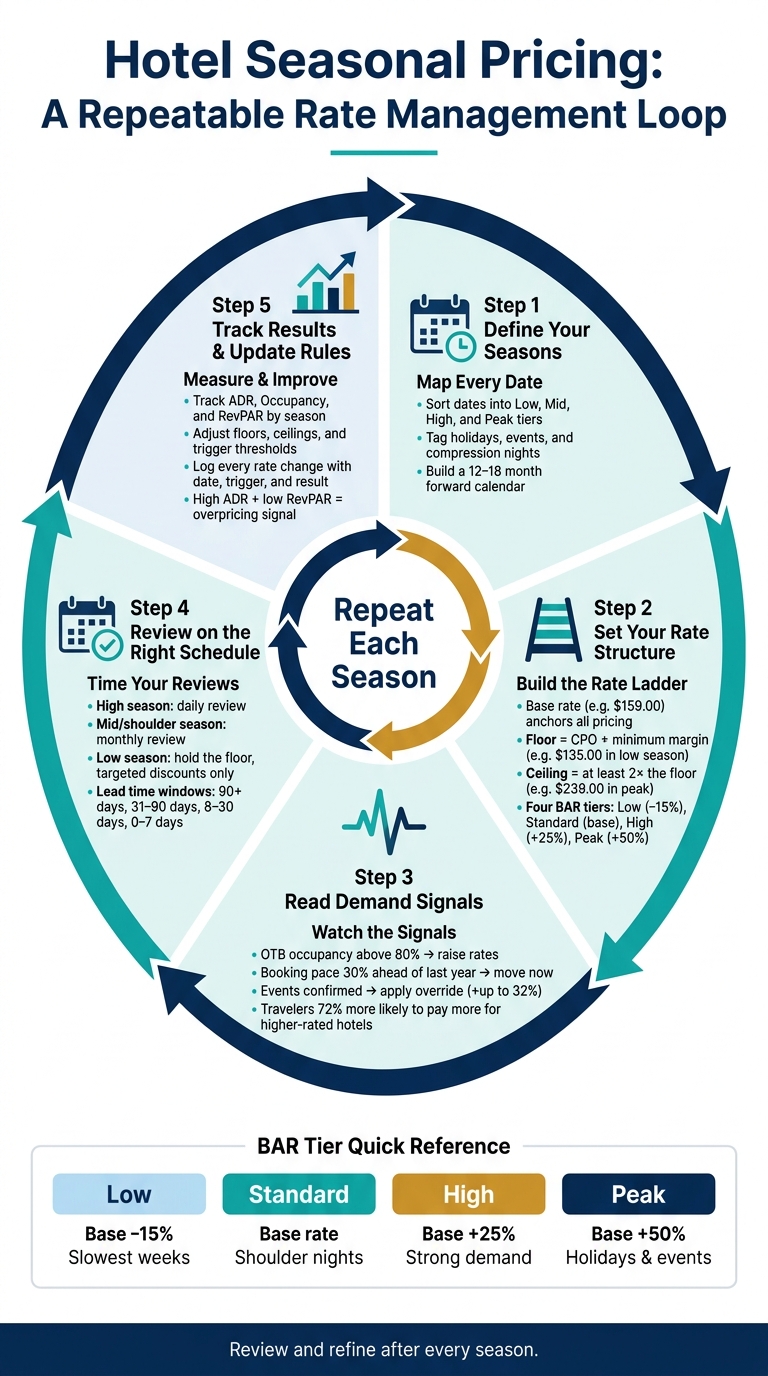
A simple example: a standard room with a $159.00 base rate might sit at $135.00 in low season and $239.00 in peak demand. Event nights can push rates up by 32%, and if a date is selling 30% ahead of last year, waiting too long can cost you.
This article lays out a clear way to set rates without relying on gut calls or last-minute changes.
How to Make a Hotel Pricing Strategy in Time for Peak Season
1. Define your seasons and build a pricing calendar
Seasonal pricing starts with one simple step: sort your dates first. Before you touch rates, assign every future stay date to a season.
1.1 Use past performance to identify high, mid, and low season
Start with the last 12 months of weekly occupancy, ADR, and RevPAR from your PMS. Look for weeks where occupancy moves by more than 10 percentage points. Those jumps usually mark the points where one season ends and another begins.
Most properties will end up with at least four tiers: low, mid, high, and peak. Low season is about covering costs and filling rooms. Mid season is where demand starts to come back, so rates can move up. High season is where you defend ADR. Peak is the busiest stretch of all, so rates should stay close to the top of your range.
You may also spot micro-seasons inside a bigger season. For example, a three-day festival can sit in a higher tier even when the weeks around it are soft.
1.2 Tag holidays, events, and compression dates
Once your base tiers are in place, layer in your holiday and event calendar. Mark federal holidays, long weekends, school breaks, and local events that can shift demand.
Some of these dates turn into compression dates – nights when demand is likely to outrun supply. Local events, concerts, and school holidays can push rates up by as much as 32%. That’s why it helps to tag them on their own, so you can apply dynamic pricing overrides when needed.
1.3 Assign every forward date to a season before pricing begins
Next, map every date on your 12–18 month forward calendar to a seasonal tier before pricing starts. This shared date map gives everyone the same frame of reference and keeps rate decisions steady.
That calendar then acts as the base for your rate floors, ceilings, and seasonal ladder.
2. Set a base rate, floor, ceiling, and seasonal rate ladder
Once your seasonal calendar is mapped out, the next job is simple: turn those dates into prices.
That starts with a hotel pricing strategies that gives you a clear middle, a hard minimum, a top end, and a few tiers between them. Think of it like guardrails. You’re not pricing every night from scratch. You’re working from a structure.
2.1 Calculate a base rate that covers costs and profit targets
Your base rate is the reference price for a standard room on a typical shoulder-season weekday. Every other rate in your structure moves up or down from that number.
Start with CPOR and add your target margin. Then compare that number with your current ADR and make small changes if needed. That gives you a base you can actually use, not just one that looks good in a spreadsheet.
From there, you can set the lower and upper limits for the rest of your rate ladder.
2.2 Set seasonal floors and ceilings for each room type
Set your floor at CPOR plus your minimum brand margin, and don’t go below it.
Your ceiling is the highest rate the market has already shown it will pay during peak demand. A common rule of thumb is to make the ceiling at least 2x the floor. If the gap is too tight, you lose room to price for seasonality.
Set these boundaries by room type and by season. A suite in peak summer shouldn’t follow the same limits as a standard room in a softer month.
2.3 Build a simple BAR tier structure for each season
With the base rate, floor, and ceiling in place, you can build a rate ladder: a small set of tiers tied to clear pricing rules. A common seasonal BAR setup uses four tiers: Low, Standard, High, and Peak. The pricing steps are -15%, base, +25%, and +50%.
| Tier | Pricing Logic | When to Use |
|---|---|---|
| Low | Base rate − 15% | Quietest weeks and slow midweek nights |
| Standard | Base rate | Average shoulder-season nights |
| High | Base rate + 25% | Strong demand periods |
| Peak | Base rate + 50% | Major holidays, events, and compression dates |
Use these tiers as the starting point for each date on your calendar. After that, look at demand signals, pickup, and competitor rates to decide when to move up and when to hold.
3. Adjust prices using demand signals, lead time, pickup, and competitor rates
Your BAR tier structure sets the baseline. Demand signals tell you when a date should move from Low to Standard, Standard to High, or stay at Peak.
3.1 Check demand signals before every rate change
Start with your seasonal ladder and treat it as the default. Then move rates only when the signals back it up. Before each change, check OTB occupancy and booking pace. After that, look at the local event calendar.
If pace is running ahead of past levels, your current rate may be too low for that date. In that case, raise it before demand hits its high point. Local events matter too. A confirmed festival or conference can support a higher rate. But if an event gets canceled, that may be a reason to hold instead of pushing a rate the market won’t support.
| Metric | Raise | Hold | Reduce |
|---|---|---|---|
| Booking Pace | Faster than same time last year | Tracking close to historical average | Slower than historical average |
| OTB Occupancy | Above 80% for the date | Near target for lead time | Well below target for lead time |
| Local Events | Confirmed festival or conference | Event status unclear | Event canceled |
| Competitor Rates | Compset is raising rates | Compset is steady | Compset is dropping or offering deep discounts |
Once the signal is clear, use lead time and pickup to judge the size of the move, or consult our hotel pricing strategies guide for more depth.
3.2 Use lead time and pickup to time rate increases and holds
Lead time helps you decide when to move. Pickup shows how fast demand is building. You need both.
Strong pickup with low OTB is usually a hold-or-raise signal, not a cue to discount. On the other hand, if pickup looks soft at 15 to 30 days out, a small rate cut may make sense, but only when occupancy sits well below target.
| Lead-Time Window | Typical Signal | Recommended Action |
|---|---|---|
| 90+ days | Pace ahead of history | Add a modest early-booking premium |
| 31–90 days | High inquiry or search trends | Hold near base; lift if pace is strong |
| 8–30 days | Soft pickup momentum | Watch closely; small downward moves only if well behind target |
| 0–7 days | High demand, low remaining supply | Hold firm or add a same-day surcharge; discount only if far behind target |
This is where timing starts to feel a bit like reading the room. If demand is building early, don’t wait too long. If demand is flat, don’t rush to cut just because the date is getting closer.
3.3 Use competitor rates as a check, not a target
Use competitor pricing as a reference point, not the final answer. Look at what nearby properties charge for the same dates and room types, then weigh that against amenities, restrictions, and guest ratings.
A lower-priced competitor is not an automatic reason to drop your rate. Travelers are 72% more likely to pay more for a hotel with higher guest ratings when compared to similar properties. So yes, your place in the compset matters. But what you offer matters too.
Use comp rates to confirm the direction you already see in your own pace and pickup data. If your pace is strong and the compset is moving up, go up. If your pace is soft and competitors are discounting, take a closer look. And if your pace is strong while another property cuts rates, hold your ground. Their problem may have nothing to do with yours.
4. Set a pricing review routine for each season
Once your rate ladder is set, build a review routine for each season. Timing matters just as much as the size of the rate change. It’s not only about how much you move prices. It’s about moving them at the right moment.
4.1 High season: review daily and raise rates sooner
During peak periods, demand can shift fast. A date that feels fine on Monday can be close to sold out by Wednesday. That’s why high-demand dates need a daily check.
If booking pace for a given date is 30% ahead of the same period last year, that’s a clear sign to lift rates now, not after the weekend. If you wait, you lose yield you can’t get back. On busy weekends, a minimum stay rule can also help stop single-night bookings from blocking higher-paying multi-night reservations.
4.2 Mid season: move rates by clear thresholds
In shoulder season, booking pace matters more than daily swings. Review these dates monthly, then change rates only when pace or occupancy passes a set threshold.
Event nights during shoulder season need their own approach. Treat them like small peak periods. Restrict inventory, lift rates, or apply stay controls right away. A major local event or festival can push rate spikes as high as 32%, so missing that moment can cost you.
4.3 Low season: hold the floor and make measured adjustments
When demand is soft, discipline matters more than speed. Do not go below your floor.
If occupancy stays low, a small, targeted discount, like a midweek rate or an extended-stay offer, often works better than cutting prices across every date. In low season, protect margin first and keep your rates anchored for the next high season.
5. Track results and update your seasonal rules
After each season, compare your actual results with the targets you set. Then tighten your rules for the next round. Use the same season map, rate ladder, and demand signals from earlier sections so you’re judging performance on the same basis each time.
5.1 Measure ADR, occupancy, and RevPAR by season
Start with the core metrics. They show whether your seasonal rules worked in the real market, not just on paper. Compare actual ADR, occupancy, and RevPAR with the targets you set at the start of each season, and review them separately for high, mid, and low periods.
| KPI | Next-Cycle Action Signal |
|---|---|
| Booking Pace | If faster than last year, raise rates earlier next cycle |
| Pickup | High pickup on soft occupancy means demand built later than expected |
| ADR | High ADR but low RevPAR signals overpricing |
| Occupancy | Consistently at 100% means your ceiling is too low |
| RevPAR | Shows overall pricing performance |
Treat event dates as their own group. If you mix them into your normal seasonal read, they can throw off the baseline and make the rest of the season look stronger or weaker than it was.
5.2 Update floors, ceilings, and thresholds after each season
Adjust your floors, ceilings, and trigger thresholds based on what actually happened. If high season keeps selling out, your ceiling likely needs to go up. If pace was strong but your system didn’t move rates soon enough, your threshold likely needs to come down.
For example, if a date ran 30% ahead of pace and you didn’t move rates until late, that’s a clear sign to lower your trigger threshold next time.
On the flip side, soft demand paired with missed rate moves usually means the threshold is set too high. One useful rule here: a healthy seasonal structure should keep the ceiling at least 2x the floor.
Those changes then become the default guardrails for the next season. To simplify this process, you can use dynamic pricing software to automate these adjustments in real time.
5.3 Keep a log of rate changes and the reasons behind them
Each time you make a meaningful rate move, write it down. That includes floor changes, event overrides, and stay restrictions. Log the date, room type, change made, trigger, and result.
It may feel a bit tedious in the moment. But later, that record gives you something far better than guesswork. You can look back and see which moves paid off, which ones came too late, and which ones didn’t help at all.
That log becomes the baseline for the next seasonal review.
Conclusion: Build the process once, then improve it each year
The value of seasonal pricing doesn’t come from one big pricing call. It comes from a process you can run again and again.
Seasonal hotel pricing works best as a repeatable loop: define seasons, set rate floors and ceilings, use real-time demand signals to adjust prices, and review results after each season.
Once those rules are set, automation makes them easier to apply the same way every time. A revenue management solution like RoomPriceGenie can apply those rules automatically using your booking data and live demand. That cuts manual work and keeps pricing within your guardrails.
After each season, review ADR, occupancy, and RevPAR. Then adjust your thresholds for the next cycle. That’s what turns seasonal pricing from a reaction into a routine.
FAQs
How often should I update seasonal rates?
Review your pricing strategy at least once every quarter so your rules still line up with shifts in segment mix and occupancy goals.
Then look at your calendar each month to see whether bookings are pacing the way you expected. If you use automated revenue management, rates can change in real time based on live demand, pickup, and occupancy signals.
What if demand changes suddenly?
When demand changes out of nowhere, manual pricing can leave money on the table or rooms sitting empty. RoomPriceGenie handles this for you by watching live demand signals like booking pace, occupancy, and local events, then updating rates up to 24 times a day.
If bookings start coming in faster, it increases prices. If demand slows down, it drops rates to help fill rooms. You can still step in and override prices for certain dates or events, while staying within the minimum and maximum rate limits you’ve set.
How do I avoid discounting too much?
Set a hard price floor using your cost per occupied room plus a profit margin. Then stick to it. Don’t go below that number, because it protects your bottom line.
To protect rate integrity, lean on value-adds instead of price cuts. That can mean complimentary breakfast, parking, or late checkout. Guests still feel like they’re getting more, but you’re not training them to expect lower rates.
If you do discount, be selective. Use it for specific low-demand gaps or fenced offers aimed at loyal, high-value guests.