Managing your hotel's online bookings
Managing your hotel’s online bookings doesn’t have to be a hassle. A channel manager integration connects your Property Management System (PMS) to booking platforms like Expedia, Booking.com, and Airbnb. This integration automates updates for room availability, pricing, and reservations in real time, eliminating manual work and reducing errors like double bookings.
Key Takeaways
- What is a Channel Manager? A tool that syncs your hotel’s inventory and pricing across multiple booking platforms from one dashboard.
- Why Integrate with a PMS? Automates data flow, saves time, reduces errors, and provides performance insights.
- Benefits:
- Save up to 35 minutes per booking.
- Increase revenue by 15–20% with dynamic pricing.
- Eliminate double bookings with real-time updates.
- How to Integrate:
- Ensure compatibility between your PMS and channel manager.
- Map rooms and rates accurately to OTAs.
- Test synchronization before going live.
- Advanced Tip: Add a revenue management system (RMS) like RoomPriceGenie for automated pricing updates based on demand.
This guide walks you through the integration process step-by-step, helping you simplify operations and boost revenue.
What Is PMS Integration For Hotel Channel Managers?
Bringing your channel manager and PMS together offers three key advantages that can simplify operations and increase profits.
Improved Efficiency and Time Savings
By integrating these systems, you can say goodbye to the tedious task of logging into multiple OTA extranets to update rates and availability. A single update in your PMS automatically syncs inventory across all platforms. For example, a 60-room hotel could save over 60 staff hours each month, with nearly 40% of property managers reporting they save more than 20 hours by automating these updates [4][7].
When a guest checks in, the PMS instantly updates room availability across all channels. Similarly, when housekeeping marks a room as clean, that information flows through the system seamlessly – no manual updates required.
Better Revenue Management
Real-time synchronization allows hotels to implement dynamic pricing strategies that adjust instantly to market shifts. For instance, if demand surges for a weekend event, automated tools can update rates across all platforms. Properties using integrated systems often see a 15–20% boost in RevPAR within the first year [7], with smaller properties sometimes reporting a 27% jump in room revenue after adopting these tools [4].
Additionally, the PMS shares valuable data, like booking patterns and occupancy trends, with the channel manager. This insight helps identify the most profitable channels, enabling you to allocate inventory more effectively and refine your distribution strategy. This data-driven approach also supports precise channel mapping and fine-tuned rate strategies, which will be explored in the next section.
Prevention of Overbookings
One of the standout benefits of integration is the elimination of double bookings, thanks to real-time inventory updates. Properties using these systems have reduced overbookings from over 10 incidents per month to none [5]. In fact, booking accuracy typically hits 100% after integration, compared to about 85% with manual processes [5].
“It’s great to have access to the channel manager because I do not have to worry about double bookings anymore – since everything automatically synchronizes with my calendar in real time.” – Philippe St-Pierre, Owner, Condo Vivaldi [6]
Even offline bookings entered into the PMS trigger instant updates across all channels, removing the need to manually close out rooms on multiple sites. This eliminates the financial and reputational headaches that overbookings can cause.
These operational benefits lay the groundwork for a smooth and efficient integration process, which will be discussed in the next section.
Step-by-Step Channel Manager Integration Process
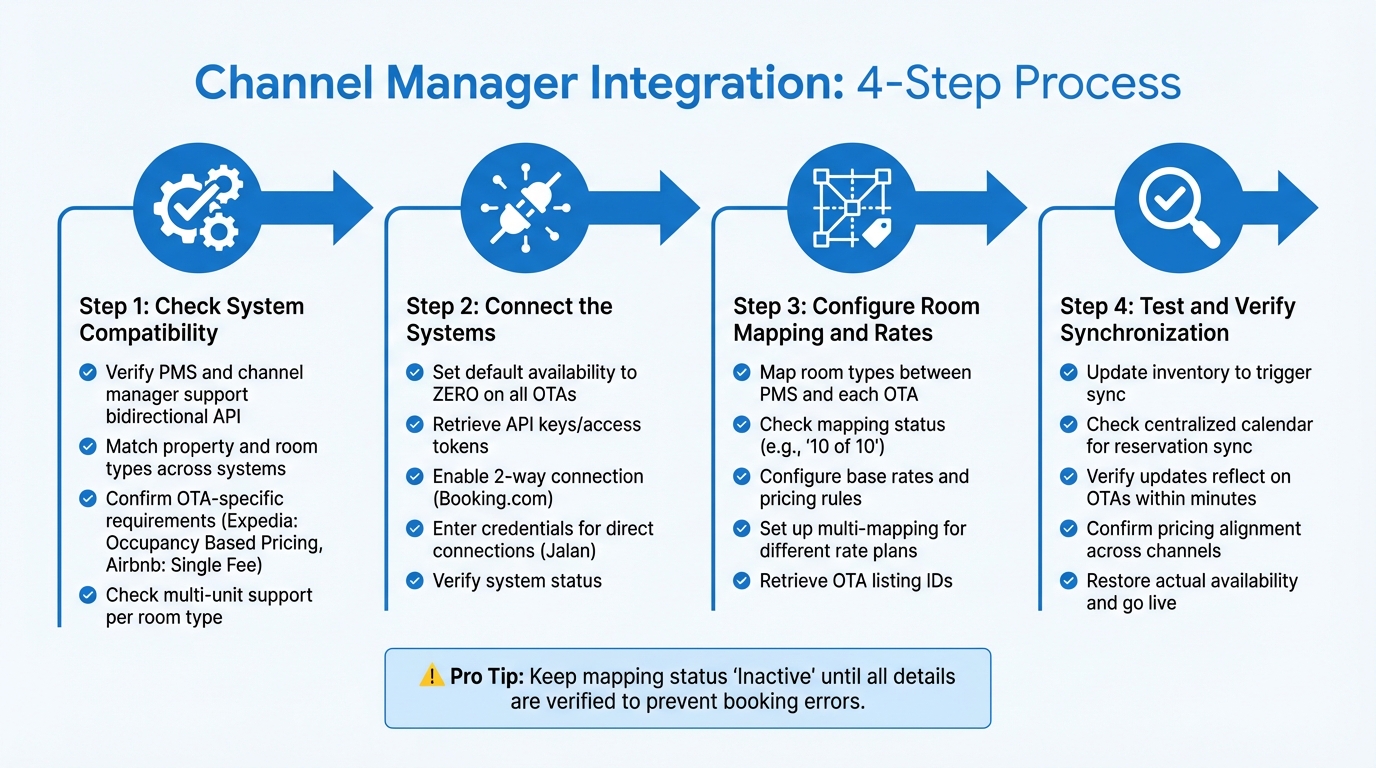
Here’s a detailed guide to help you integrate your channel manager with your PMS.
Step 1: Check System Compatibility
First, ensure your PMS and channel manager are compatible and support a bidirectional API connection. This type of connection allows instant updates for inventory, rates, and restrictions across all platforms [1]. Double-check that each property in your PMS matches a corresponding property on the OTA, and make sure room types are consistent in both naming and number to prevent mapping errors [8]. Keep in mind that some OTAs have specific requirements. For instance, Expedia often uses “Occupancy Based Pricing”, while Airbnb switches to a “Single Fee” pricing model when integrated through a channel manager [3]. Confirm if the OTA supports multiple units for each room type, and reach out to their support team to adjust pricing models if necessary [3].
Once you’ve confirmed compatibility, you’re ready to connect the systems. For those using specialized tools, smaller hotel revenue management often involves specific PMS integrations to streamline this process.
Step 2: Connect the Systems
Begin by setting the default availability to zero on all OTAs before starting the connection process. This prevents double bookings during setup [3]. Then, retrieve the API keys or access tokens from your channel manager – these are crucial for linking your systems [9]. Some OTAs, like Booking.com, require you to enable the “2-way Connection” option in their extranet settings. For others, such as Jalan, you’ll need to enter your account credentials directly into the channel manager dashboard [3]. Once these steps are complete, check the system status to confirm the connection [3].
Step 3: Configure Room Mapping and Rates
Now, map the room types and rates between your PMS and each OTA. Each room type in your PMS should align with its counterpart on every OTA. Use the mapping status feature in your channel manager to identify any unmapped rates and resolve them [1]. If the mapping is complete (e.g., “10 of 10”), you’re good to go. Otherwise, update the mappings as needed and retrieve IDs from your OTA listings to finalize the process [3]. Additionally, configure your base rates and pricing rules to match the settings in your OTA extranets. If you plan to sell the same room under different rate plans – like standard, package, or promotional rates – use a multi-mapping strategy to link one room rate to multiple OTA listings [1].
Once mapping is done, it’s time to test the synchronization.
Step 4: Test and Verify Synchronization
After completing the mapping, manually or in bulk, update your inventory to trigger synchronization. This will help confirm that rates, availability, and restrictions are updating correctly across all channels [1]. Check your centralized calendar to ensure reservations from your website and OTAs are syncing seamlessly [6]. Test the system by making updates in your PMS and verifying that changes reflect on OTAs within minutes [6]. Double-check that pricing settings align with the specific requirements of each channel. Once everything is verified, restore your actual availability numbers and start accepting bookings across all platforms.
Channel Mapping and Configuration Strategies
Once your systems are connected, the next step is to configure your channel mapping thoughtfully. A well-planned setup can help you boost revenue while avoiding distribution hiccups. How you map room types, apply restrictions, and prioritize your distribution channels plays a big role in your property’s overall revenue management performance.
Mapping Room Types and Rates to OTAs
Start by ensuring that room types and rate plans in your PMS match exactly with those listed on each OTA. For instance, if your PMS lists a “Deluxe King” room priced in USD, the OTA must reflect the same room name, occupancy, and pricing details. Any mismatch can lead to synchronization issues.
Log into each OTA extranet, like Booking.com, to authorize your channel manager. Keep the mapping status set to “Inactive” until you’ve double-checked all details. Be sure to specify whether rates are “Net” or “Sell/Gross” so the displayed prices are accurate.
Take advantage of multi-mapping to link one room to multiple rate plans – such as standard, non-refundable, or package deals – while maintaining a single inventory. Always review the “Rates Mapped” count. A full match (e.g., “10 of 10”) means everything is synced, but any discrepancies could lead to lost bookings or revenue.
Once you’ve completed room mapping, the next step is setting rate parity and applying restrictions.
Applying Rate Parity and Restrictions
Rate parity determines how you price your rooms across different platforms. With wide parity, you offer the same or better rates on OTAs as on your website. Narrow parity, on the other hand, allows for lower rates on select OTAs without undercutting your direct bookings. This is important since OTAs account for anywhere from 25% to 75% of online hotel bookings [10].
After activating your channel manager, manage all pricing and restrictions directly through your PMS. Avoid making manual updates on individual OTA sites to prevent conflicts. Use restrictions like “Closed to Arrival” (CTA) or “Minimum Length of Stay” (MLOS) during busy periods, such as holidays or local events.
If you’re looking to encourage direct bookings, focus on adding perks rather than slashing prices. Offer extras like free airport transfers, late check-out, or flexible cancellation policies. You can also use Closed User Groups – like loyalty programs or email lists – to offer exclusive rates that stay hidden from metasearch engines, ensuring compliance with parity rules.
Prioritizing High-Performance Channels
Once your mapping and pricing strategies are in place, shift your attention to the channels that perform the best. Analyze platforms based on booking volume, revenue, and occupancy. For example, in 2026, 26% of travelers started their booking journey on Booking.com [1][2]. Also, consider the commission and fee structures for each channel. High-volume platforms may justify higher commission rates, but you can protect your margins by marking up base rates on these portals.
Give priority to channels that support two-way API integrations instead of iCal connections. APIs allow real-time updates – often within 2 to 3 minutes – while iCal connections can lag, increasing the risk of double bookings. Use your channel manager’s performance reports to identify which room types sell the fastest and at what price points. Properties that use integrated PMS and channel manager systems have reported returns as high as 63x by making smarter distribution decisions [2].
“At first I thought it was just a myth that using SiteMinder could boost revenue. But it turned out to be true. Revenue did increase, we are also more efficient in terms of time.”
Perform regular audits to ensure your top-performing channels always have full access to your inventory. Check that the “Rates Mapped” numbers match your total available rates. Any mismatch could mean missed opportunities to maximize revenue.
Integrating Revenue Management Tools for Automated Pricing
Once you’ve mapped out your distribution channels and ensured rate parity, the next logical step is incorporating automated revenue management tools into your system. This streamlines the pricing process, removing the need for manual adjustments. By directly linking your revenue management system (RMS) with your channel manager and property management system (PMS), you can achieve full automation. Live occupancy data is pulled in real-time, optimal rates are calculated, and updates are instantly applied across all distribution channels. This integration builds on earlier synchronization efforts, extending automation to optimize revenue.
Benefits of Automated Revenue Management
RoomPriceGenie takes the guesswork out of pricing by automatically adjusting room rates multiple times a day. It factors in historical performance, competitor pricing, market trends, and local event data. With pricing recommendations available up to 18 months in advance, you can secure early bookings at rates that maximize revenue [11][15]. This automation eliminates the need to constantly monitor competitors or manually update rates across multiple OTA extranets, saving you hours of work each week.
On average, properties using RoomPriceGenie have reported a 19% annual increase in revenue [11][12].
“RoomPriceGenie is a great tool for those of our customers who want to benefit from dynamic pricing but do not have the manpower to analyze and optimize in-house.”
Integration with Channel Managers and PMS
Connecting a revenue management system like RoomPriceGenie to your existing infrastructure is a straightforward process. Start by confirming that RoomPriceGenie has an API connection with your current PMS and channel manager [13]. During setup, you’ll define pricing parameters by setting minimum and maximum rate thresholds for each room type. Next, map your room types so the system knows which listings to update across all distribution channels [1][11].
Activating “Autopilot” mode allows your PMS to send live availability data directly to RoomPriceGenie. The system uses this data to calculate optimal rates and automatically update them across all channels in real time [11][12]. This hands-off approach minimizes errors and ensures your pricing remains competitive around the clock [13][14].
“Thanks to the seamless integration between Beds24 and RoomPriceGenie, price optimization across all sales channels is fully automated, so our customers save time and resources.”
Conclusion
Using a channel manager alongside your PMS streamlines operations by centralizing control, so you no longer need to juggle multiple OTA platforms or deal with repetitive data entry. With two-way synchronization, inventory updates happen automatically across all channels, cutting down manual work – saving up to 35 minutes per booking and increasing ROI by as much as 63×[2]. On top of that, channel managers provide access to hundreds of global and regional OTAs, helping you reach a broader audience without piling on extra tasks [2].
Accurate room mapping ensures smooth distribution across these platforms, reducing errors. Add to this the power of automated tools, and you have a recipe for smarter revenue management. By integrating your PMS, channel manager, and RMS tools like RoomPriceGenie, you create a system that adjusts pricing in real time based on demand. Updates are pushed out automatically, keeping your rates competitive around the clock. This automation lets your team focus on what truly matters – delivering outstanding guest experiences.
FAQs
How can I confirm that my PMS and channel manager are compatible for integration?
To make sure your property management system (PMS) and channel manager work well together, it’s important to confirm that their data and settings are properly aligned before starting the integration. This helps avoid mistakes and keeps things running smoothly.
Here are some key steps to follow:
Align properties and room types: Make sure every property and room type in your PMS has a matching entry in your channel manager, including correct names and quantities.
Review OTA-specific requirements: For platforms like Airbnb, double-check that room types with multiple units are supported.
Set availability to zero temporarily: Reduce your OTA availability to 0 during setup to prevent accidental bookings.
Check for conflicting connections: Confirm that the property isn’t already linked to another channel manager.
Following these steps can help you avoid issues like double bookings and ensure the integration process goes smoothly. If you’re unsure about anything, reach out to your PMS or channel manager’s support team for help.
What are the main advantages of connecting a revenue management system to my channel manager?
Integrating a revenue management system with your channel manager lets you automatically push real-time, optimized room rates across all your booking platforms. This not only helps boost revenue but also improves occupancy rates while cutting down on manual tasks and minimizing pricing errors.
By centralizing pricing and automating rate adjustments, you can shift your focus to providing outstanding guest experiences. Meanwhile, the system takes care of pricing updates based on demand, competitor activity, and other important factors. It’s an efficient way to streamline operations and achieve stronger results for your hospitality business.
How can I use a channel manager to avoid overbookings?
To prevent overbookings, it’s crucial to keep your property management system (PMS) and all online travel agencies (OTAs) in sync. A channel manager simplifies this process by centrally managing your inventory and ensuring real-time updates across every platform.
Start by enabling real-time two-way syncing between your PMS and channel manager. This ensures that availability, rates, and reservations are updated instantly. Take care to properly map each room type and rate plan between your PMS and OTAs to avoid any mismatches. During the initial setup, it’s a good idea to set your default availability to zero. This precaution prevents bookings from slipping through before the integration is fully functional.
You can also use inventory restrictions to control how many rooms each OTA can sell. Let the channel manager handle automatic updates for reservations or cancellations in your PMS to cut down on manual errors. For added efficiency, consider integrating tools like RoomPriceGenie, which combines automated pricing adjustments with real-time inventory updates. This approach ensures smoother operations and helps keep overbookings at bay.