


Where should you focus today? For multi-property revenue teams, finding the answer can mean opening properties one by one, exporting data and rebuilding the bigger picture in a spreadsheet or navigating a system that’s waaay too complex for what they need. It takes time and when the picture is hard to assemble, it’s harder to know what needs attention first.
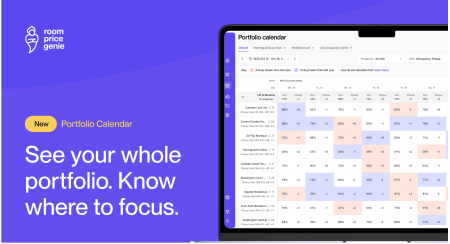
That’s why we’re introducing Portfolio Calendar, a feature designed specifically for multi-property operators. It brings the information you already use into one clear, scrollable view, so you can review your portfolio without piecing it together property by property.
A clearer view of every property

With each property in its own row, it’s easier to scan performance across the calendar and spot where a closer look could help. Choose the key metrics you want to see and compare performance across properties and dates.
Group properties into clusters, by region, brand or another structure that makes sense for your business, to make like-for-like reviews easier. Save the views your team returns to regularly, and bring them back when it’s time for the next check-in.
From the bigger picture to the detail
A portfolio view shouldn’t mean losing sight of what’s happening at an individual property. Select a date to explore its performance and the adjustments affecting it. When it’s time to make a change, open that property’s own calendar directly from the portfolio view.
Portfolio Calendar works alongside the property-level calendar. Staff in charge of your revenue management can move between portfolio-wide visibility and the detail needed to understand and act.
Built with multi-property businesses, for multi-property businesses
We worked closely with multi-property teams to understand how they manage revenue across their portfolios. Their input helped shape a calendar designed around a practical need: see what’s happening across the group, find where attention is needed, and get into the details without adding unnecessary complexity.
David Heigl, our Chief Product Officer, puts it this way: “Managing revenue across a hotel group brings a different set of challenges. You need to understand what’s happening across the entire portfolio, but knowing where to focus can take time when information is spread across individual properties. We worked closely with hotel groups to understand how their teams operate, and that shaped the Portfolio Calendar. It gives revenue managers the bigger picture immediately, so they can spot where performance needs attention and get into the detail quickly. It’s an important step in our continued investment in multi-property businesses, with more improvements planned to help multi-property teams work more effectively.”
Explore the interactive Portfolio Calendar tour or talk to RoomPriceGenie about how it could work for your properties.
FAQ
What is RoomPriceGenie’s Portfolio Calendar?
Portfolio Calendar is a RoomPriceGenie feature that brings every property into one scrollable calendar view. Each property has its own row, making it easier for revenue teams to review performance across their portfolio.
Who is the Portfolio Calendar for?
It’s for revenue teams at hotel groups and other multi-property businesses that want to oversee performance across several properties.
Can I group properties by region or brand?
Yes. You can organize properties into clusters by region, brand or another structure that suits your business. Saved views are separate: each user can save their own selection of properties and settings for recurring reviews.
Does the Portfolio Calendar replace each property’s calendar?
No. It adds a portfolio-level view alongside the individual property calendars. Open a property’s calendar from the portfolio view when you need to make changes.
Can I change prices directly in the Portfolio Calendar?
No. The portfolio view is read-only. To adjust pricing, open the relevant property’s calendar.
To learn how RoomPriceGenie can help your property increase your property’s profitability, start your free trial of our automated pricing solution today!