

Si vos données PMS sont en retard, vos tarifs sont également en retard. Je résumerais tout ce sujet ainsi : la tarification dynamique est la solution la plus efficace lorsque votre PMS, votre RMS et votre gestionnaire de canaux partagent des données en temps réel, se synchronisent dans les deux sens et disposent de règles claires concernant les erreurs, les limites et les validations.
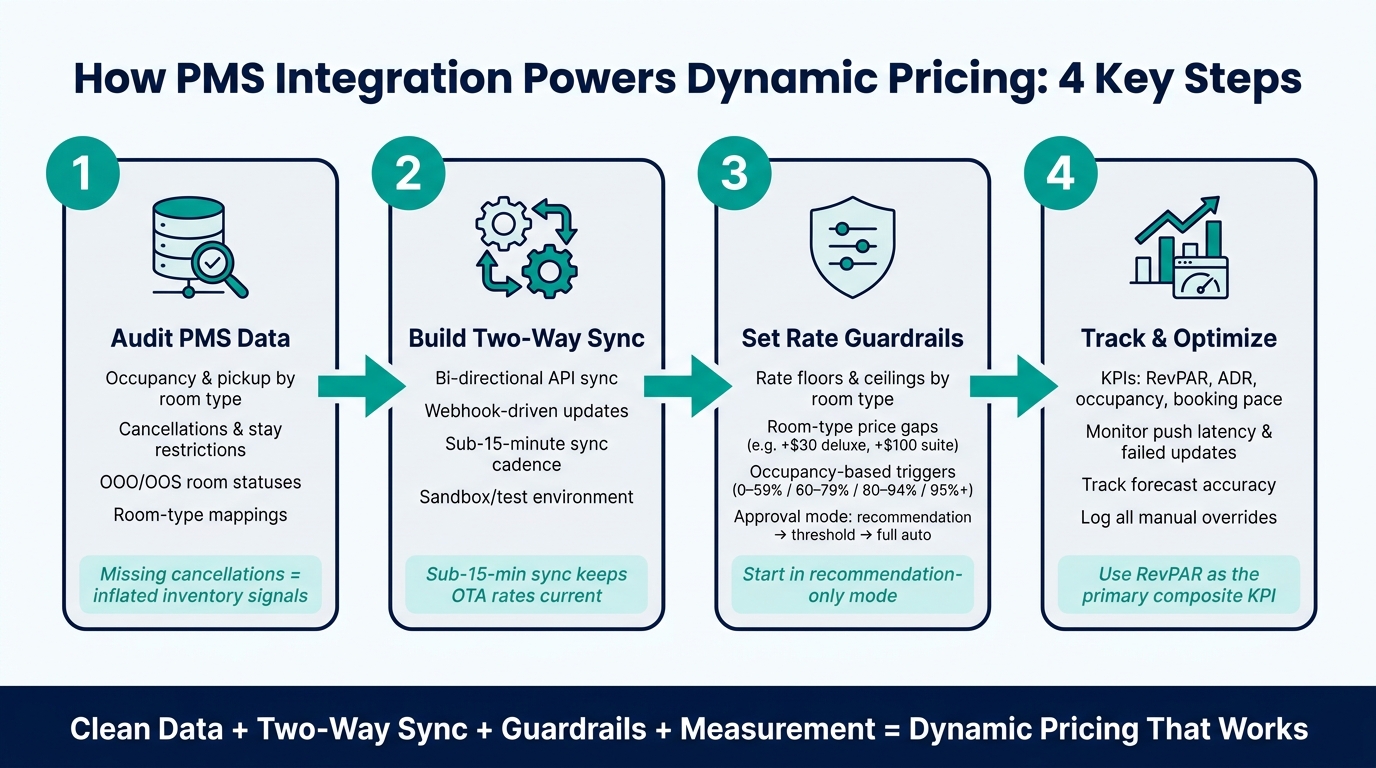
Pour faire simple, je mettrais l'accent sur quatre points :
- Commencez par nettoyer les données PMS: le taux d'occupation, les arrivées, les annulations, les types de chambres, les taxes, les frais et le statut des chambres sont autant de facteurs qui influencent la fixation des prix.
- Synchronisation bidirectionnelle du système: les tarifs doivent être exportés, et les modifications apportées aux réservations doivent être réimportées, sans intervention manuelle.
- Évaluation des garde-fous: définissez les prix planchers et plafonds, les écarts de prix selon le type de chambre et les règles de validation avant la publication automatique.
- Suivre les résultats après le lancement: comparer le RevPAR, l'ADR, le taux d'occupation, le rythme des réservations, les annulations, le temps de latence des mises à jour, les mises à jour ayant échoué et les modifications manuelles par rapport à une référence établie avant le lancement.
Quelques détails retiennent particulièrement l'attention. L'article souligne que temps de synchronisation inférieur à 15 minutes, ce qui est important car des données obsolètes peuvent entraîner des taux trop élevés, trop bas ou manquants sur certains canaux. Le rapport souligne également que annulations et erreurs de répartition des salles sont des points de défaillance courants. Et une fois que l’automatisation est lancée, je surveillerais RevPAR, précision des prévisions et erreurs de tarification de près, afin que les prix ne s'écartent pas.
En résumé : L'intégration au PMS améliore la tarification dynamique en fournissant au système de tarification les données actualisées sur les réservations et les disponibilités, en renvoyant rapidement les tarifs mis à jour et en réduisant les erreurs manuelles. Mais je ne ferais pas confiance à l'automatisation sans mappages précis, journaux d'audit, tests de fonctionnement et règles de dérogation écrites.
Vérifiez vos données PMS et la configuration de l'intégration avant de passer à l'automatisation
L'efficacité de l'automatisation de la tarification dynamique dépend entièrement de la qualité des données et des liaisons système qui la sous-tendent. Si les données d'entrée sont incohérentes ou si la configuration est défaillante, les résultats le seront également. C’est pourquoi vous devez vérifier vos données PMS, vos mappages et vos chemins d’intégration avant la mise en service de l’automatisation. Commencez par examiner les données transmises par votre PMS et la manière dont chaque système échange des données. Associez ensuite ces données validées au workflow de tarification.
Vérifiez les champs de données qui déterminent la tarification
Examinez attentivement les éléments qui déterminent la tarification : le taux d'occupation et le nombre de réservations par date et par catégorie de chambre, les annulations, restrictions de séjour telles que MinLOS, CTA et CTD, les formules tarifaires, les taxes et les frais. Si certaines de ces données sont manquantes, obsolètes ou mal associées, votre outil de tarification prend des décisions sur la base d'informations erronées.
Deux questions reviennent sans cesse.
- Annulations manquantes peut donner l'impression que le nombre de chambres disponibles est plus élevé qu'il ne l'est en réalité, ce qui maintient des tarifs trop élevés pour des chambres qui sont en réalité disponibles [2][4]
- Mise en correspondance des types de chambres non concordante peut entraîner la publication de mises à jour tarifaires dans la mauvaise catégorie de chambre et provoquer des incohérences tarifaires entre les différents canaux [2]
Vous devriez également vérifier votre Hors service (OOO) et hors fonctionnement (OOS) statuts des chambres. Si ces statuts sont erronés, le signal d'inventaire est faussé et les recommandations tarifaires s'écartent de la ligne de conduite prévue [2].
Vérifier les exigences d'intégration
Toutes les intégrations ne fonctionnent pas de la même manière. Par exemple, une connexion unidirectionnelle – où les données ne circulent que du gestionnaire de canaux vers le PMS – signifie que votre RMS ne peut pas renvoyer les tarifs de manière autonome. Votre équipe se retrouve alors contrainte de procéder à des mises à jour manuelles, ce qui augmente le risque de surréservation. [2]. Vous devez également vous assurer que la configuration permet de transférer les champs clés dans les deux sens sans intervention humaine.
| Exigence d'intégration | Pourquoi est-ce important pour la tarification dynamique ? | Éléments à vérifier |
|---|---|---|
| Synchronisation bidirectionnelle | Garantit la synchronisation bidirectionnelle des tarifs et des disponibilités, ce qui réduit le travail manuel et le risque de surréservation [2] | Vérifier que le RMS peut transmettre les tarifs au PMS et que le PMS peut transmettre les mises à jour relatives au taux d'occupation et aux réservations au RMS |
| API pilotée par des webhooks | Transmet les données dès qu'une réservation est effectuée, ce qui permet des mises à jour en moins de 15 minutes [2] | Vérifiez que le système utilise des webhooks déclenchés par des événements plutôt qu'un interrogateur planifié. |
| Accès à l'environnement de test/au bac à sable | Protège les données en production tout en vérifiant que l'intégration fonctionne comme prévu [2] | Effectuer des réservations, des modifications et des annulations à titre d'essai dans un environnement hors production |
| Journalisation des audits | Fournit une piste d'audit permettant de déterminer pourquoi un taux n'a pas été mis à jour ou a été publié de manière erronée [2] | Vérifiez que chaque mise à jour de taux inclut l'utilisateur, l'horodatage, la valeur précédente et la nouvelle valeur. |
Il y a un autre détail de configuration à prendre en compte ici : les connexions via des API modernes permettent généralement de réduire la latence et les erreurs de mappage. [2].
Attribuer la responsabilité des mappages, des erreurs et des remplacements
Ce type de configuration fonctionne mieux lorsque les responsabilités sont clairement définies. Le service Revenue Management doit être responsable des règles de tarification. Le service opérationnel doit être responsable de la précision du PMS. Le service informatique doit être responsable de la surveillance des connexions. [2].
Il est également utile de définir un système de référence unique pour chaque type de données. Dans de nombreux cas, il s’agit du PMS pour les stocks, les catégories de chambres et l’état des réservations. Lorsque les systèmes ne concordent pas, votre équipe doit savoir lequel prévaut. Et si quelqu’un doit effectuer une modification manuelle, celle-ci doit passer par le RMS, et non directement par le PMS ou le gestionnaire de canaux. [2].
Une fois la propriété définie, le processus de tarification peut passer du mode de configuration au mode de mises à jour en temps réel.
Intégrez le PMS à votre processus de tarification
Utilisez les conclusions de l'audit pour transformer les données PMS validées en règles de tarification. Mais avant de modifier le moindre paramètre, définissez très clairement ce que vous attendez du système. C'est votre objectif qui détermine tout : quels signaux sont pertinents, dans quelle mesure les tarifs doivent évoluer et quelles mesures de sécurité doivent être mises en place.
Définir des objectifs de tarification et choisir les indicateurs de demande
Tarification dynamique devrait tenir compte des variations saisonnières, des fluctuations de la demande selon les jours de la semaine, des jours fériés et des événements locaux.
Une fois l'objectif clairement défini, choisissez les signaux de demande que votre moteur de tarification utilisera. Ces groupes de signaux vous aideront à configurer votre système :
| Catégorie de données | Signaux spécifiques à surveiller | L'objectif de la tarification dynamique |
|---|---|---|
| Interne (PMS) | Taux d'occupation, nombre de clients, rythme des réservations, durée du séjour | Indique quand il convient de relever les taux en raison d'une forte demande intérieure, ou de les abaisser pendant les périodes de ralentissement |
| Externe (marché) | Tarifs des concurrents, événements locaux | Permet d'aligner vos tarifs sur l'évolution du marché |
| Opérationnel | Chambres hors service, lavage groupé | Permet d'éviter la survente et améliore les prévisions |
| Restrictions | MLOS, CTA, CTD | Protège les dates très prisées en imposant des séjours plus longs ou en limitant les arrivées ; encouragez ces pratiques à l'aide de messages afin d'augmenter les recettes sur l'ensemble des types de séjours, et pas seulement sur les nuitées isolées [1][2] |
Configurer les correspondances, les règles et la fréquence de mise à jour
Une fois vos objectifs et vos indicateurs définis, faites correspondre vos catégories de chambres et vos formules tarifaires (non remboursables, petit-déjeuner compris, etc.) entre le PMS et l'outil de tarification. Ainsi, chaque mise à jour tarifaire sera correctement prise en compte. [2].
Essayez de cadence de synchronisation inférieure à 15 minutes entre le RMS, le PMS et le gestionnaire de canaux. Ce délai est suffisamment court pour transmettre les nouveaux tarifs aux agences de voyages en ligne (OTA) avant que la demande ne change [2]. RoomPriceGenie se connecte à votre PMS ou à votre gestionnaire de canaux et automatise la mise à jour des tarifs en s'appuyant sur les données de réservation en temps réel, les tendances de la demande, les signaux liés aux événements et le suivi de la concurrence.
Testez le processus de mise à jour des tarifs complets avant la mise en service
Avant le lancement, testez le parcours complet des tarifs dans un environnement de test afin de ne pas modifier les tarifs en production.
- Vérifier que les données du système de gestion hôtelière (PMS) sont bien transmises à l'outil de tarification – Vérifiez que les événements liés à l'occupation, à la prise en charge et aux réservations sont bien enregistrés et dans les délais.
- Vérifiez que les recommandations correspondent bien au type de chambre et à la date souhaités – Veillez à ce qu’une proposition tarifaire ne soit pas attribuée à un type de chambre ou à une date erronés.
- Vérifier que les tarifs mis à jour sont bien renvoyés au PMS et correctement publiés sur tous les canaux – Vérifiez que la valeur, le type de chambre et le plan tarifaire corrects apparaissent dans le PMS, et que les agences de voyage en ligne (OTA) et le moteur de réservation directe affichent le même tarif ainsi que les éventuelles restrictions de séjour.
Les annulations de tests et les modifications de réservation sont également prises en compte séparément. C'est souvent là que se manifestent les problèmes de latence et de cartographie. [2].
Une fois que le parcours tarifaire complet fonctionne de bout en bout, ajoutez les seuils minimaux, les plafonds et les règles de validation avant la mise en production.
Définir des limites tarifaires et des contrôles d'approbation
Une fois que le processus de mise à jour des tarifs fonctionne correctement, mettez en place des garde-fous avant d’automatiser la publication. L’intégration au PMS accélère considérablement les changements de prix. C’est là tout l’avantage. Le hic est simple : une vitesse sans limites peut entraîner des tarifs trop bas ou trop élevés. Les garde-fous définissent des limites claires entre ce qui peut être mis en ligne automatiquement et ce qui nécessite l’intervention d’une personne.
Définir les règles relatives aux étages, aux plafonds et à l'occupation
Commencez par définir un seuil minimal basé sur le coût total de vente : main-d'œuvre, frais de distribution, équipements et positionnement de la marque. Fixez ensuite un plafond en fonction du prix que le marché est prêt à payer pour ce type de chambre à cette date. Définissez ces limites par type de chambre, et non selon une fourchette unique applicable à l'ensemble du property. Par exemple, une chambre standard pourrait avoir un seuil minimal de $149.00 et un plafond de $349.00, tandis qu'une suite serait située plus haut aux deux extrémités [9][11].
Le taux d'occupation devrait constituer le principal facteur déclencheur, le rythme des réservations déterminant la décision finale. Voici un exemple concret de point de départ pour une chambre standard : [5][9]:
| Taux d'occupation | Évolution des cours |
|---|---|
| 0%–59% occupé(e) | Maintenir le tarif de base ou appliquer une remise modérée et contrôlée pendant une période déterminée |
| 60%–79% occupés | Le taux augmente légèrement à mesure que la demande s'intensifie |
| 80%–94% occupés | Augmenter les taux de manière plus marquée ; les stocks restants sont limités |
| 95% ou supérieur | Appliquer la tranche tarifaire la plus élevée autorisée |
Vous devrez également veiller à préserver les écarts de prix entre les différents types de chambres. Si votre chambre standard est $229.00, le séjour en chambre Deluxe doit durer au moins $30.00 plus élevé, et la suite devrait rester au moins $100.00 plus élevé [6]. Vérifiez ces écarts au niveau du prix plancher, du tarif de base et du prix plafond. Si vous omettez cette étape, les arrondis ou les recommandations distinctes peuvent créer une situation confuse où une chambre de meilleure catégorie finirait par coûter moins cher qu’une chambre de catégorie inférieure.
Pour les périodes de forte demande, telles que les grandes fêtes, les salons professionnels et les festivals locaux, appliquez un ensemble de règles distinct. Cela se traduit généralement par un tarif de base plus élevé, moins de réductions et règles relatives à la durée minimale de séjour lorsque des séjours de courte durée viendraient freiner une demande plus forte. Même dans ce cas, le plafond reste applicable. Ces règles spécifiques à certaines dates devraient rapprocher les tarifs de cette limite maximale et signaler les hausses inhabituelles afin qu’elles soient examinées, et non contourner le plafond de leur propre chef. [5][6].
Ces limites définissent la fourchette. Les contrôles d'approbation déterminent ce qui se passe lorsqu'un taux sort de cette fourchette.
Choisissez un mode d'approbation et définissez les procédures de dérogation
Une fois que vous avez défini les limites de débit, déterminez qui est habilité à approuver les exceptions. Le meilleur paramétrage dépend avant tout d’un élément : le degré de confiance que vous accordez aux données et la stabilité de l’intégration.
| Type de commande | Objectif | Exemple de configuration | Risque en cas d'omission |
|---|---|---|---|
| Mode « recommandations uniquement » | Permet à une personne de rester informée de l'avancement de la publication pendant que vous validez les données et les recommandations | Le système propose $249.00; le responsable des recettes doit donner son accord avant la mise en ligne | Réponse plus lente et tarification manuelle incohérente |
| Approbation basée sur un seuil | Automatise les modifications courantes ; signale les exceptions | Publication automatique dans $149,00–$349,00; toute modification supérieure à celle-ci doit faire l'objet d'un examen 10% dans les 24 heures | Les taux aberrants peuvent être publiés sans avoir été vérifiés |
| Automatisation complète | Optimise la rapidité et la cohérence des processus éprouvés et fiables | Taux de mise à jour en fonction des plafonds et des planchers, des écarts entre les types de chambres et des exceptions liées aux dates d'événements | Des erreurs de planification ou des signaux de demande erronés peuvent rapidement avoir des répercussions sur de nombreuses dates et de nombreux canaux |
Une bonne façon de mettre cela en place consiste à commencer par un mode « recommandations uniquement » pendant une phase pilote ou tant que les données du PMS sont encore en cours de vérification. Une fois que les correspondances sont correctes et que l’évolution des tarifs semble stable, passez à un système d’approbation basé sur des seuils. L’automatisation complète devrait intervenir plus tard, après avoir vérifié que l’intégration fonctionne de bout en bout et qu’une personne surveille régulièrement les performances.
Avant le lancement, consignez par écrit votre procédure de dérogation. Précisez clairement qui est habilité à accorder une dérogation, pour quelles raisons, pour quelles dates et quels types de chambres, ainsi que la date d’expiration de cette dérogation. Enregistrez chaque dérogation et réexaminez-la ultérieurement afin qu’une solution temporaire ne devienne pas, sans que personne ne s’en aperçoive, une règle permanente. [10][2].
Pour groupes multi-property, renforcer encore davantage les contrôles. Une autorisation de la direction devrait être requise pour toute modification supérieure à 10%, les taux qui dépassent une fourchette de taux définie par la marque, ou toute mise à jour liée à des comptes sous contrat ou à la date d'un événement majeur [7].
Mesurer les résultats et affiner l'intégration
Une fois l'intégration opérationnelle, la donne change. La mise en place est terminée. Il s'agit désormais d'évaluer les résultats.
Suivre une valeur de référence et surveiller les performances en temps réel
Avant de lancer l'automatisation, enregistrez au moins quatre semaines de données historiques correspondant à la même saison ou à la même période de réservation. Il s'agit de réaliser une comparaison à périmètre constant, et non un simple instantané aléatoire. Suivez le taux d'occupation, le prix moyen par chambre (ADR), le revenu par chambre disponible (RevPAR), le rythme des réservations à 30, 14 et 7 jours, les annulations, ainsi que le temps consacré à la tarification manuelle. Utilisez RevPAR en tant qu'indicateur clé de performance (KPI) composite principal [14].
Commencez modestement. Choisissez un type de chambre à faible risque ou une plage de dates limitée, puis lancez le système en mode « recommandation » ou « validation ». Comparez les suggestions tarifaires du système avec vos décisions prises manuellement. Ensuite, activez publication automatique pour les dates sélectionnées, tout en conservant les limites tarifaires actuelles. N'étendez ces limites que lorsque les tarifs, les disponibilités et les réservations s'alignent comme prévu.
Votre tableau de bord en temps réel doit comparer les résultats actuels à la fois à la situation de référence d'avant le lancement et à une période antérieure similaire. Vérifiez quotidiennement le rythme des réservations et des prises de réservation. Vérifiez le taux d'occupation et l'évolution des tarifs au moins une fois par semaine. Surveillez également les annulations par canal et par type de chambre. Il est également utile de suivre les détails pratiques de la connexion :
- pourcentage de mises à jour des taux confirmées avec succès
- latence moyenne de transmission
- mises à jour ayant échoué
- alertes relatives aux données obsolètes
- commandes manuelles
Veillez à conserver les mêmes dates d'arrivée, les mêmes segments et les mêmes catégories de chambres au fil du temps. Cela permet de déterminer plus facilement si ce sont les tarifs qui ont influencé le résultat ou si la demande a simplement évolué d'elle-même. Précision des prévisions mérite également une attention particulière. Lorsqu’il commence à baisser, c’est souvent un signe avant-coureur d’un problème lié aux données ou à la configuration, avant même que le RevPAR ne révèle l’ampleur des dégâts [16][17].
Utilisez ces chiffres pour détecter les problèmes de synchronisation avant qu'ils ne commencent à peser sur le chiffre d'affaires.
Dépannage des problèmes d'intégration courants
Lorsque les performances baissent ou que les alertes se déclenchent, identifiez d'abord la cause. Ne modifiez pas les paramètres à l'aveuglette en espérant que tout ira bien.
La plupart des problèmes survenant après le lancement sont dus à des défaillances dans la diffusion des tarifs, à des données obsolètes, à des erreurs de mappage ou à un nombre excessif de modifications manuelles. Si les résultats en production s'affaiblissent, vérifiez le chemin de mise à jour avant de modifier les tarifs.
| Problème constaté | Cause probable de l'intégration | Vérification recommandée |
|---|---|---|
| La mise à jour des tarifs n'apparaît pas sur une plateforme OTA | Erreur de mappage, connexion expirée ou rejet au niveau du canal | Vérifier la correspondance entre les chambres et les plans tarifaires, réauthentifier la connexion, renvoyer la portée concernée et vérifier le tarif public sur l'extranet de l'OTA [13][15] |
| Données obsolètes concernant l'occupation ou les réservations | Synchronisation peu fréquente, échec d'une tâche API ou décalage horaire | Comparez l'horodatage de la dernière réservation et le nombre total de nuitées enregistrés dans le PMS avec les données reçues par l'outil de tarification ; vérifiez la fréquence des mises à jour, les tâches ayant échoué, les identifiants API et les paramètres de fuseau horaire, puis suspendez la mise à jour automatique des tarifs jusqu'à ce que le flux de données soit à jour. [13] |
| Mise en correspondance incorrecte entre la chambre et le plan tarifaire | Le type de chambre dans le PMS est associé à une chambre erronée sur l'OTA, ou le tarif est associé à un tarif parent erroné | Effectuez une mise en correspondance entre le PMS, l'outil de tarification, le gestionnaire de canaux de distribution et les fiches de mise en correspondance OTA en utilisant les mêmes identifiants ; corrigez la mise en correspondance à la source et renvoyez les dates concernées, puis effectuez une recherche ou une réservation test. [13] |
| Dérogations répétées à la même règle | Les signaux de la demande, les garde-fous ou les informations fournies par la concurrence ne reflètent pas la réalité du marché local | Consignez chaque dérogation en précisant la date, le taux, le motif et le résultat ; si ce schéma se répète chaque semaine, modifiez la règle plutôt que de traiter chaque cas comme un cas isolé. [3] |
Si un tarif n'apparaît pas sur un canal, notez la valeur indiquée dans le PMS ou le système de tarification, l'horodatage, le type de chambre concerné, le plan tarifaire, la date, le taux d'occupation et tout message d'erreur avant de vous lancer dans l'analyse. Ces détails vous feront gagner du temps. Un problème de synchronisation implique souvent de procéder à une mise à jour complète des disponibilités ou des tarifs, puis d'effectuer une réservation test pour vérifier que la correction a bien fonctionné. [13][15].
Si le problème vient de données obsolètes, ne laissez pas les anciens chiffres d'occupation déclencher une révision automatique des tarifs. Remettez le système en mode « validation » jusqu'à ce que le décalage soit corrigé.
Conclusion : ce qu'apporte réellement une meilleure intégration du PMS
L'intégration PMS permet au système de tarification dynamique de fonctionner à partir de données plus précises et plus récentes. Lorsque les taux d'occupation, les réservations et la disponibilité des chambres sont transférés d'un système à l'autre sans délai, la tarification peut s'adapter à la demande en temps réel plutôt qu'à des données obsolètes. La synchronisation bidirectionnelle permet également d'éviter les saisies en double et les erreurs de publication manuelles.
Une plateforme comme RoomPriceGenie peut prendre en charge l'optimisation des tarifs en temps réel, le suivi de la concurrence, l'analyse de la demande et la connectivité directe avec les PMS ou les gestionnaires de canaux de distribution. Mais le property a encore du chemin à parcourir. Il doit vérifier ses données, examiner les exceptions et mesurer les résultats par rapport à une référence. L’intégration n’améliore la tarification que lorsque les données sont propres, que les correspondances sont correctes et que des garde-fous sont en place. L’automatisation apporte de la rapidité. L’équipe veille à ce que les résultats restent précis.
questions fréquentes
Comment savoir si mes données PMS sont suffisamment fiables pour permettre une tarification dynamique ?
Vérifiez que le mappage de vos données est exact et cohérent entre votre PMS, votre système de gestion des revenus et votre gestionnaire de canaux de distribution. Les codes de catégorie de chambre, les identifiants des plans tarifaires, les définitions des restrictions et les structures fiscales doivent correspondre exactement.
Vous devrez également vous assurer que votre système de gestion hôtelière (PMS) collecte et transmet les données appropriées, notamment le taux d'occupation, le rythme des réservations et les disponibilités restantes. De plus, vérifiez que la synchronisation bidirectionnelle fonctionne comme prévu et que les journaux d'audit ne signalent aucune erreur.
Quelle vitesse de synchronisation est suffisante pour garantir des mises à jour fiables des taux ?
Pour bénéficier de mises à jour fiables des taux, visez une fréquence de rafraîchissement de 15 minutes maximum. Si votre cycle d'interrogation est plus long que cela, des retards peuvent se produire. Les mises à jour déclenchées par des événements permettent d'éviter cela en transmettant les modifications dès qu'elles surviennent.
Lorsque vous vérifiez votre configuration, indiquez connexions API bidirectionnelles plutôt que les anciennes méthodes XML ou iCal. C'est le meilleur moyen d'atteindre cet objectif de moins de 15 minutes et de garantir la synchronisation des tarifs sur tous les canaux.
Dans quels cas dois-je privilégier les validations plutôt que l'automatisation complète ?
Privilégiez les processus de validation plutôt que l'automatisation complète lorsque vous souhaitez exercer un contrôle direct sur votre stratégie tarifaire avant la mise en ligne des tarifs.
Ce mode vous permet d'examiner et d'approuver manuellement les modifications de tarifs, ce qui vous offre un contrôle accru tout en continuant à tirer parti des analyses basées sur les données fournies par votre système de gestion des revenus.